
Managing your own files is one skill. Managing a team’s access to those same files, without exposing sensitive data, creating conflicting edits, or losing track of who owns what, is an entirely different challenge. The moment you add a second attorney to your practice, your solo-built Clio Manage environment becomes a shared database, and shared databases without proper architecture are a liability.
Right now, most growing firms in the solo to boutique law firm scaling phase make the same mistake: they buy additional user licenses and hand everyone the same login level they use themselves. That approach does not scale. It creates security exposure, ethical compliance gaps, and operational chaos that compounds every time someone new joins the team.
This article shows you exactly how to configure Clio Manage for a multi-attorney environment, covering permission architecture, matter-level restrictions, workflow standardization, and the firm-wide SOPs that keep your team producing work at your standard rather than their own.
The Growing Pains of the Solo-to-Boutique Transition
When you built your Clio environment as a solo practitioner, simplicity was the priority. Now that you are bringing on associates, paralegals, or a partner, that same simple setup creates real operational and ethical risks. A database built for one decision-maker cannot safely serve a team without being deliberately re-architected.
The Security Risk of Shared Master-Account Access
Most solo attorneys operating in Clio Manage have been working from a single login with full administrative access. That works fine when you are the only person in the system. The moment a second user touches that same environment with the same permissions, every action they take carries the same administrative weight as yours, including the ones you would never intentionally authorize.
The ABA Model Rules require you to maintain reasonable measures to prevent unauthorized access to client data. Sharing master-account credentials or granting blanket administrative access to new hires is arguably a per se failure of that standard. Here is what that exposure actually looks like in practice:
- Accidental deletion risk: An associate can delete matter files, billing records, or court deadline entries with no permission barrier to stop them.
- Credential compromise: A single breached login exposes every client file, billing record, and communication log in your entire database simultaneously.
- No accountability trail: Without role separation, there is no audit log distinguishing your system actions from a new hire’s, making internal accountability impossible.
- Firm setting modifications: Any user can alter billing rates, document templates, or firm-wide configurations, creating silent errors that are difficult to trace and even harder to reverse.
- Cross-data exposure: Without granular controls, granting a paralegal document access also grants them visibility into partner compensation records and trust account data.
These are not edge-case scenarios. They are the predictable outcomes of a system that was never designed for multiple users operating at the same permission level.
Why Decentralized Document Tracking Causes Communication Chaos
When multiple attorneys upload documents to matters without a standardized folder structure, files disappear. Not because anyone deleted them, but because no one agreed on where they should live in the first place. This is one of the most common friction points in the solo to boutique law firm scaling process.
The compounding effect is that every attorney on your team ends up operating with a partial picture of any given matter. That fragmentation is how deadlines get missed and how malpractice exposure accumulates quietly across a growing caseload:
- Shadow filing: Associates save draft pleadings in personal folders rather than the matter document library, making them invisible to the supervising attorney.
- Version confusion: Multiple drafts of the same motion exist in different locations with no clear indicator of which version is current and approved.
- Communication gaps: Client communications are logged inconsistently across emails and notes, leaving holes in the matter history that surface during billing disputes or malpractice inquiries.
- Deadline fragmentation: Critical deadlines live in personal email threads or individual calendars rather than in Clio Manage’s centralized task system where the whole team can see them.
- Incomplete conflict data: Intake forms are not consistently linked to matter files, leaving conflict check records incomplete and creating ethical exposure from day one.
Each of these problems is individually manageable. Collectively, across a team of three or four attorneys sharing the same system, they create a level of operational disorder that no amount of effort can rescue after the fact.
| Want to remain solo? Read: How to Scale Solo Law Firm Operations Safely Using Secure AI Automation |
Re-Architecting Clio Manage Permissions for Multi-User Teams
The principle of least privilege is straightforward: every user in your system should have access to exactly what they need to do their job, and nothing beyond that. Applying that principle inside Clio Manage is the foundation of how you configure Clio Manage safely for a growing team. It is not a technical nicety. It is the architecture that keeps your client data protected and your ethical obligations met.
Configuring Security Groups and Role-Based User Permissions
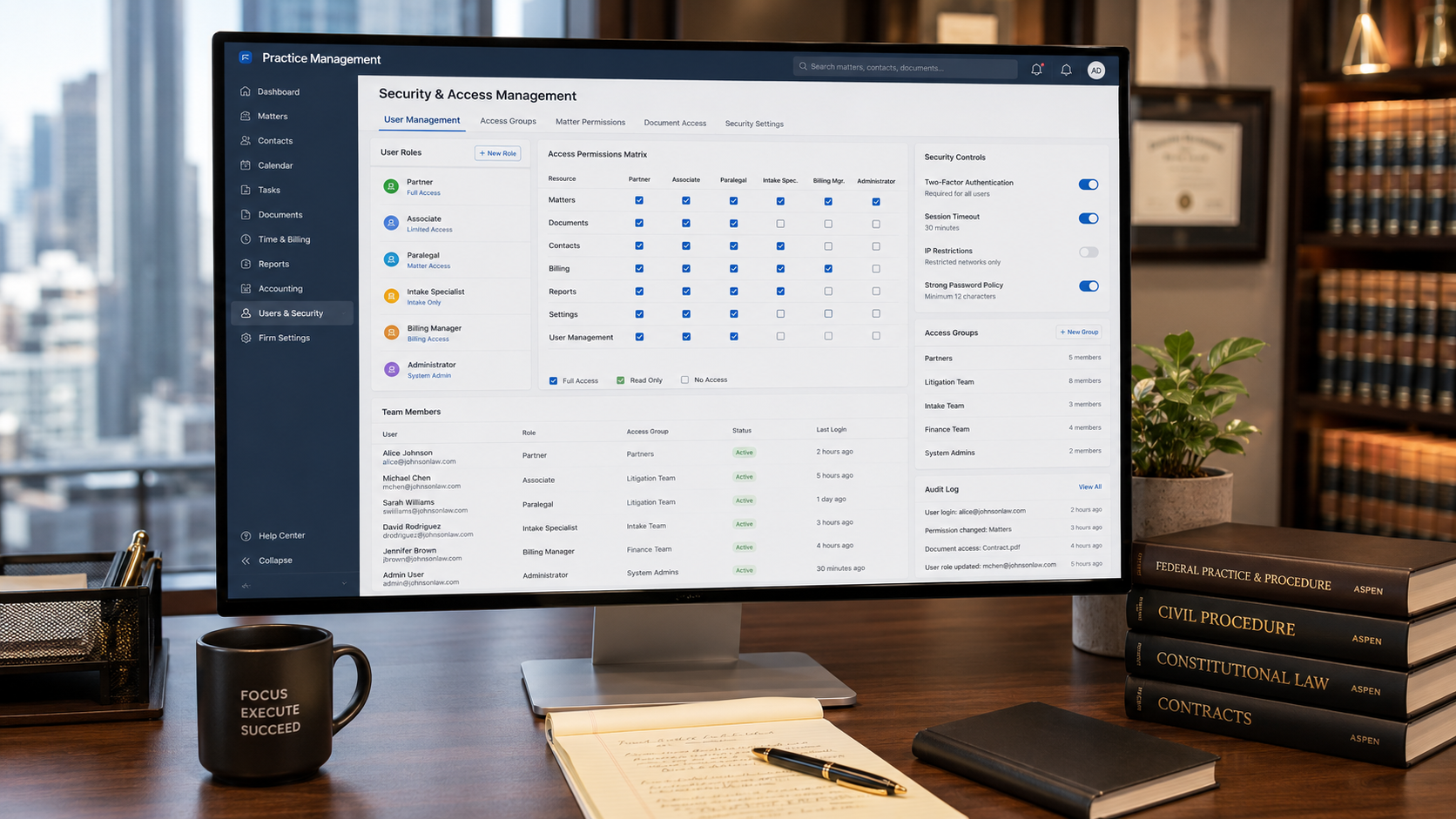
Clio Manage’s security group framework lets you define precisely what each user type can see, edit, create, and delete. You build the role once, then assign users to it rather than managing permissions individual by individual. That scalability is what makes it the correct approach for a growing firm.
When you configure Clio Manage with proper security groups, a new associate or paralegal is onboarded into a pre-defined permission environment from their first login. There is no manual setup required per user, and no risk of accidentally granting elevated access because you were in a hurry. Here is a clean role structure to build from:
- Managing Partner: Full administrative access including billing configurations, trust accounting, firm settings, and unrestricted matter file visibility.
- Associate Attorney: Access to assigned matters, time entry, document upload, and task management, with no visibility into billing rate structures, trust records, or other attorneys’ matters.
- Paralegal / Legal Assistant: Read and write access to assigned matter documents and task lists only, with no access to client billing data, financial reports, or case strategy notes from other files.
- Virtual Paralegal / Contractor: Restricted access to specific matters only, with automatic exclusion from every other client file in the database.
- Billing Administrator: Access to invoicing, payment records, and time entry approval workflow only, with no visibility into matter documents, case strategies, or communications.
This structure means your new associate logs in on day one and can only access the matters they are assigned to. They cannot browse your full client list, and they cannot modify configurations that affect the rest of the firm.
Clio Manage also allows permission controls at the individual feature level, not just matter level. That granularity is what separates a properly configured multi-attorney environment from a system that simply has multiple logins pointing at the same data.
Implementing Matter-Level Restrictions for Conflicting Cases
Security groups handle broad access by user role. Matter-level restrictions address the more nuanced ethical reality of a growing practice: sometimes two attorneys in the same firm cannot share access to the same case data, regardless of their role. When you configure Clio Manage correctly, those restrictions are enforced by the system rather than by memory.
This is not just an operational preference. It is a direct compliance requirement under ABA Model Rule 1.6 and Rule 1.7. Here is how to structure matter-level restrictions across your growing team:
- Ethical screen logging: Formally exclude screened attorneys from specific matters where a conflict of interest exists, with that exclusion documented in the system audit log.
- Opposing party flags: Matters involving opposing parties from other active files can be flagged so access is automatically restricted to the originating attorney and approved team members only.
- Sensitivity tiers: High-sensitivity matters involving domestic violence, celebrity clients, or sensitive immigration cases can be restricted to a named team group with no broader firm visibility.
- Intake hold restrictions: New intake files can be set to restricted by default until a conflict check is completed and clearance is formally documented in the matter notes.
- Archived matter controls: Former client files can be archived with restricted edit access while remaining searchable for conflict check purposes without being modifiable by current staff.
Matter-level restrictions are what make your ethical compliance structural rather than behavioral. You are not relying on attorneys to remember to stay out of files they should not access. The system enforces it for them.
| Is your growing database ready to handle multiple users without exposing confidential data? Transitioning your infrastructure to a multi-user environment requires strict permission mapping to prevent security oversights. Click here to evaluate your current setup parameters before you onboard your next hire. |
Building Firm-Wide Standard Operating Procedures (SOPs)
Your associates will produce work at the quality level your system permits. If your system has no standardized templates, no shared task workflows, and no centralized research library, their output will reflect that inconsistency. When you configure Clio Manage with firm-wide SOPs, you set a non-negotiable quality floor across every attorney and paralegal on your team.
Creating Group-Assigned Clio Task Lists and Deadline Workflows
Clio Manage’s task list automation lets you build matter-type-specific workflows that trigger automatically when a new file is opened. Every immigration matter, every dissolution case, and every foreclosure defense file gets the same structured checklist from day one, regardless of which attorney opened it.
These automated task lists do not replace attorney judgment. They enforce the baseline process discipline that prevents simple administrative failures from generating malpractice claims. The 2025 Clio Legal Trends Report consistently finds that firms with structured workflow automation report significantly higher realization rates and fewer billing disputes than those operating on ad-hoc task management. Consider building the following task sequences into your firm-wide configuration:
- Matter open task list: Conflict check verification, retainer request trigger, client communication log initialization, and matter custom field completion.
- Litigation sequence task list: Initial deadline calendar entry, discovery period milestones, motion filing reminders synced to court scheduling orders, and deposition prep triggers.
- Associate supervision task: Automatic notification to the supervising partner to review any new matter assignment within 48 hours of the file being opened.
- Pre-hearing preparation task list: Exhibit organization, client preparation call, witness coordination, and court filing confirmation, all triggered 30 days before any scheduled hearing date.
- Monthly billing review task: Time entry audit, draft invoice generation, trust account reconciliation, and client billing communication, triggered on the last business day of each month.
Once these task sequences are built and assigned to user groups, your team runs on a consistent operational rhythm that does not require your personal supervision at every step.
Centralizing Research Repositories and Jurisdictional Template Frameworks
One of the biggest hidden costs in a growing boutique firm is duplicated research time. Your associate spends three hours researching an issue your firm has already litigated twice. A centralized document and research repository inside Clio Manage eliminates that waste immediately.
When you configure Clio Manage with a shared research infrastructure, your associates build on your firm’s existing knowledge base rather than starting from scratch on every matter. Here is the framework to set up:
- Tiered document folder structure: Separate active matter folders from shared firm resources, including template libraries, jurisdictional precedent files, and approved research memos.
- Practice area pleading templates: Build standard templates for each practice area using Clio’s document automation, pre-populated with jurisdiction-specific formatting, standing boilerplate, and approved citation styles.
- Verified research memo library: Store LexisNexis-verified research memos in shared folders, tagged by legal issue type, so every attorney can access prior work before committing new research hours.
- Jurisdictional template frameworks: Maintain court-specific filing formats, local rule references, and case caption templates for every jurisdiction your firm regularly practices in, updated after each significant procedural change.
- Approved client communication library: Centralize approved client-facing email templates in Clio Grow so every attorney on your team communicates with the same professional tone, accurate legal disclaimers, and consistent firm branding.
This shared infrastructure is what transforms a group of individual attorneys into a functioning firm. Your associates should be building on your research foundation, not unknowingly duplicating it.
Stepping Into the Role of a Managing Partner Safely
The operational shift from solo practitioner to managing partner is harder than most attorneys expect. Not because of the legal work, but because of the infrastructure gap. Your practice management system was built for one decision-maker, one billing rate, and one set of client files. It was never designed to hold a team.
The solo to boutique law firm scaling process has a predictable failure point: the managing partner who hands out user licenses before re-architecting the database. Your associates inherit a system built for your individual workflow, and the mismatches between that system and their actual responsibilities create security gaps, missed deadlines, and ethical exposure that compound with every new file.
When you configure Clio Manage with proper security groups, matter-level restrictions, automated task workflows, and centralized document repositories, you are not just adding users to software. You are building the operational architecture that lets your firm grow without losing the data security and quality control your reputation depends on.
The right time to build this infrastructure is before your next hire starts, not the week after they log in for the first time. Get the architecture right first. Then bring your team into a system that is actually ready for them.
| Related reading: Clio Grow Automation: How to Streamline Solo Law Firm Intake Without the Administrative Burden |
Ready to Securely Scale Your Firm’s Database Architecture?
You do not have to put your firm’s data privacy at risk or spend your weekends troubleshooting permission errors, broken calendars, or missing file locations for your new team members.
Levis is a Nairobi-based virtual freelance paralegal and Clio Certified Administrator with 7 years of hands-on U.S. legal operations experience, remotely supporting solo and boutique law firms in immigration, family law, corporate, and civil litigation matters. Levis has conducted legal research across countless matters using LexisNexis and Westlaw, helped attorneys reduce drafting time through automated Clio workflows, and provided end-to-end practice management support for firms.
- The Infrastructure Build: Configure Clio Manage security groups, implements advanced user access constraints, and builds automated firm-wide litigation playbooks tailored to your practice areas.
- The Research & Validation Partner: Give your new associates an elite operational edge. Levis leverages full-tier LexisNexis and Shepard’s Citations access to vet drafts, audit output quality, and supply deep precedent research so your firm’s filings remain completely sue-proof.
Let’s plug your operational revenue leaks today.
- Click here to select a convenient time on Calendly for a free 15-minute diagnostic strategy call.
- Prefer an initial email review? Fill out the secure Contact Form here with your biggest system bottleneck, and Levis will respond within 1 business day.
Disclaimer: Top Legal Support provides freelance legal operations, litigation support, and document preparation services exclusively to licensed, practicing attorneys. We do not provide direct legal advice or representation to the public.